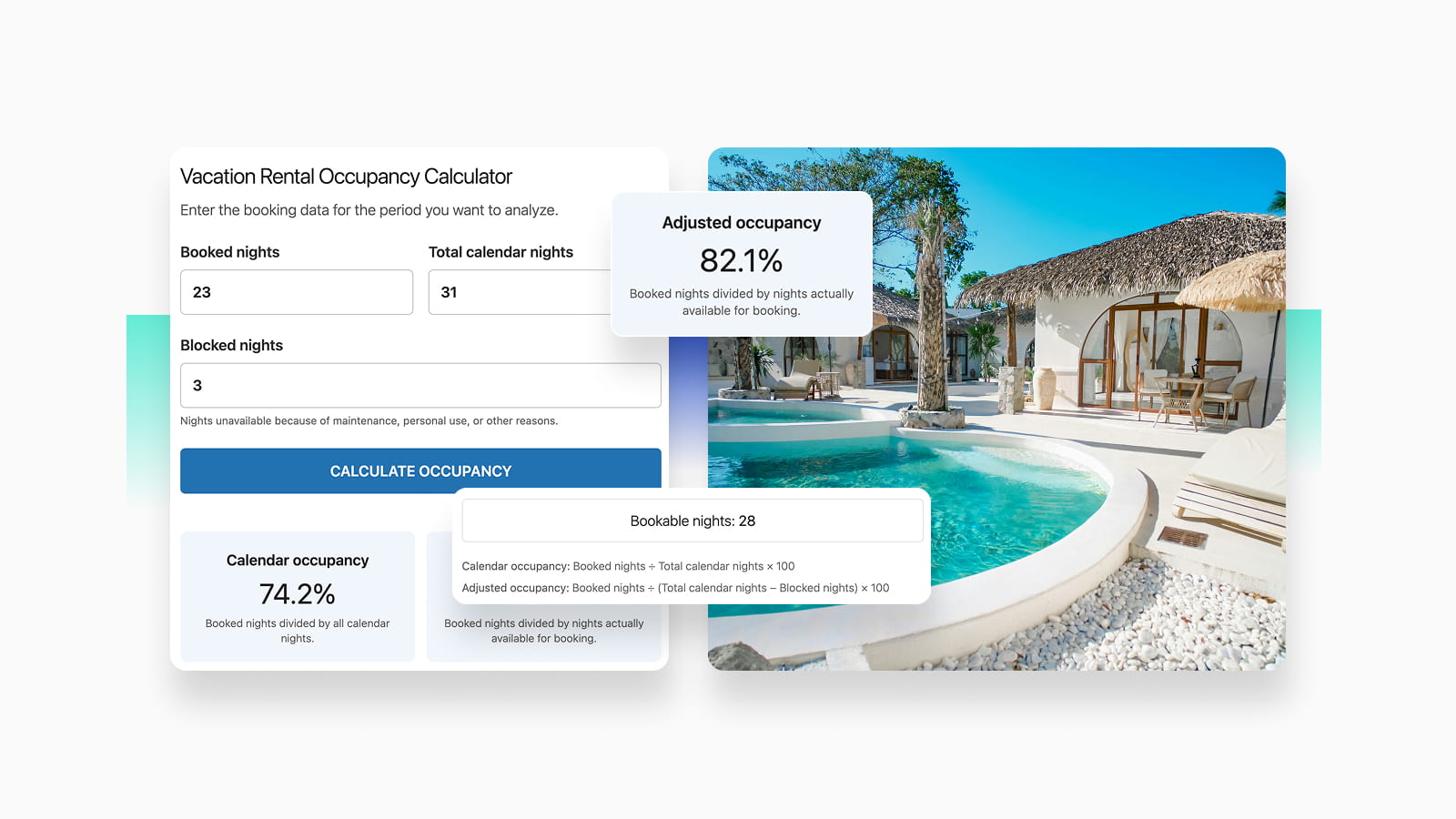
Before you may want to jump to more complex formulas for calculating your revenue growth opportunities or profit per booked night, or even profit margins related to bookings, use this simple occupancy calculator first to see the occupancy percentage per property.
The occupancy percentage formula is integrated into the calculator under the hood:
Vacation Rental Occupancy Calculator
Enter the booking data for the period you want to analyze.
Calendar occupancy: Booked nights ÷ Total calendar nights × 100
Adjusted occupancy: Booked nights ÷ (Total calendar nights − Blocked nights) × 100
Basic Occupancy Rate Formula
How to calculate occupancy percentage in hotel?
The most basic occupancy formula is still very helpful for any hotel or independent property. How to calculate occupancy? Here is what you need to calculate occupancy percentage:
Occupancy Rate = (Booked Nights ÷ Available Nights) × 100
Example: if your property was available for 30 nights and booked for 21 nights:
21 ÷ 30 × 100 = 70% occupancy
For multiple properties, use:
Occupancy Rate = Total Booked Nights ÷ Total Available Nights × 100
📑 Improve Guest Experience: Best Digital Guidebooks for Short-Term Rentals
More Occupancy Formulas for Pricing, Revenue & Overall Hotel or Property Profitability
Looking to become a true guru of your analytics and spreadsheets related to revenue and occupancy? A single occupancy rate calculator won’t give you a bigger picture.
Then the formulas to calculate occupancy rate below might come in handy. We’ve structured them so you can see where each is best used and how to calculate it properly. Each formula also has a more or less official name, which we’re including as well.
You may want to create a spreadsheet with all these formulas, which can later be analyzed using various AI tools.
For example, just pull your real hotel or property data into these formulas, then let an additional tool analyze it to give you a clearer picture of your occupancy. So, how to calculate occupancy percentage with more advanced formulas without the occupancy percentage calculator?
| Metric | What it helps measure | Formula |
|---|---|---|
| Adjusted Occupancy Rate | Occupancy based only on nights actually available to guests | Booked Nights ÷ Actually Available Nights × 100 |
| ADR (Average Daily Rate) | Average accommodation revenue earned per booked night | Accommodation Revenue ÷ Booked Nights |
| RevPAR | Revenue generated from every available night | Accommodation Revenue ÷ Available Nights or ADR × Occupancy Rate |
| Average Length of Stay (ALOS) | How long guests typically stay | Total Booked Nights ÷ Number of Bookings |
| Average Booking Value | Average revenue generated by each reservation | Total Booking Revenue ÷ Number of Bookings |
| Revenue per Booked Night | Average revenue per occupied night, including extras | Total Revenue Including Extras ÷ Booked Nights |
| Net ADR | Avg. revenue retained per booked night after commissions/fees | Net Accommodation Revenue ÷ Booked Nights |
| Net RevPAR | Net revenue generated per available night | Net Accommodation Revenue ÷ Available Nights |
| Cancellation Rate | How much of your booking volume is lost to cancellations | Cancelled Bookings ÷ Total Bookings × 100 |
| Direct Booking Rate | Share of bookings received directly instead of through OTAs | Direct Bookings ÷ Total Bookings × 100 |
| Repeat Guest Rate | How much business comes from returning guests | Bookings from Returning Guests ÷ Total Bookings × 100 |
| Average Booking Lead Time | How far in advance guests usually book | Total Lead-Time Days ÷ Number of Bookings |
| Revenue Growth | Revenue change compared with a previous period | (Current Revenue − Previous Revenue) ÷ Previous Revenue × 100 |
| Occupancy Growth | Occupancy change compared with a previous period | (Current Occupancy − Previous Occupancy) ÷ Previous Occupancy × 100 |
| Break-Even Occupancy | Minimum occupancy needed to cover property costs | Fixed Costs ÷ Contribution per Booked Night ÷ Available Nights × 100 |
| Contribution per Booked Night | How much each occupied night contributes toward fixed costs and profit | ADR − Variable Cost per Night |
| Profit per Booked Night | Actual profit generated by each occupied night | Net Profit ÷ Booked Nights |
| Profit Margin | Percentage of revenue retained as profit | Net Profit ÷ Total Revenue × 100 |
7 Tips to Increase Your Vacation Rental Occupancy Rate
Of course, some of the biggest occupancy factors are difficult or impossible to change – e.g. you can’t move your property to a more popular destination or suddenly create year-round demand in a seasonal area!
But there are things you can do to attract more guests and fill more available nights.
1. Get visible where travelers are searching
The more places guests can discover your property, the more opportunities you have to turn empty nights into bookings.
Along with major OTAs, consider visibility on Google Vacation Rentals, where eligible properties can appear across Google’s travel search experience with information such as rates, availability, location, and booking links.
If travelers are already looking for accommodation in your area, you want your property to be among the options they see.
2. Polish your direct booking experience
If you accept direct bookings alongside Airbnb, Booking.com, and other OTAs, your own website should be also very convenient (not less than OTAs!).
Super fast, super professional, mobile-friendly, and trustworthy – this is how your direct booking site should feel.
It should have clear availability, transparent pricing, familiar payment options, and a secure checkout. What’s more, it’s easy to have a direct booking widget like BNBForms on whatever site you have now (or even without it).
The easier it is to complete a booking, the fewer potential guests you risk losing between checking availability and paying.
3. Turn local events into booking opportunities
For many travelers, the real attraction is a festival, concert, sports event, conference, Christmas market, wedding season, or another event happening nearby. Not the property itself.
That’s why, we recommend keeping track of what is happening around your property and promoting relevant events through your website, blog, email, and social networks. Optimize this content for people searching for places to stay during those dates.
Events can create short periods of unusually high demand, so they can also help you identify dates when you should adjust pricing, minimum stays, or availability.
4. Your marketing is your occupancy engine
Use the marketing channels that make sense for your destination: Google Ads, social media advertising, local travel websites, tourism portals, partnerships, and even ChatGPT advertising (yes, those are also available now). OpenAI now provides an Ads Manager for creating ChatGPT advertising campaigns, although availability and reach can still vary.
Your property should be difficult to overlook online.
5. Take care of repeat guests
A guest who already stayed with you and had a great experience is much easier to bring back than a completely new traveler who is comparing dozens of properties.
Stay visible after checkout through email marketing, SMS, social media, loyalty offers, or direct booking discounts (they might share it with their friends). You can also remind previous guests about seasonal events or suggest returning at a different time of year.
6. Adjust your pricing instead of accepting empty nights
Occupancy and pricing go hand in hand. If certain weekdays, seasons, or last-minute dates consistently remain empty, your pricing may need adjustment.
You may want to experiment with weekday discounts, last-minute rates, early booking offers, longer-stay discounts, or dynamic pricing. That doesn’t mean you need to chase 100% occupancy simply by making the property too cheap.
The goal should be to find the right balance between occupancy and revenue, which is why metrics such as ADR and RevPAR are useful alongside occupancy rate.
7. Improve the listing based on what guests actually choose
Finally, look at your property from a guest’s perspective. Compare it with nearby rentals competing for exactly the same dates.
Could the photos be better? Are important amenities missing? Is the description unclear? Are your reviews weaker than those of nearby competitors? Research using Airbnb data has found that factors such as the number of reviews and amenities can be useful indicators of occupancy performance.
Use your own booking data too with the occupancy calculator. If occupancy suddenly drops, compare periods, channels, prices, minimum-stay rules, reviews, and availability.