You can add a security deposit to your bookings in BNBForms. Please note that the security deposit will not be refunded automatically. You will need to refund it manually if required.
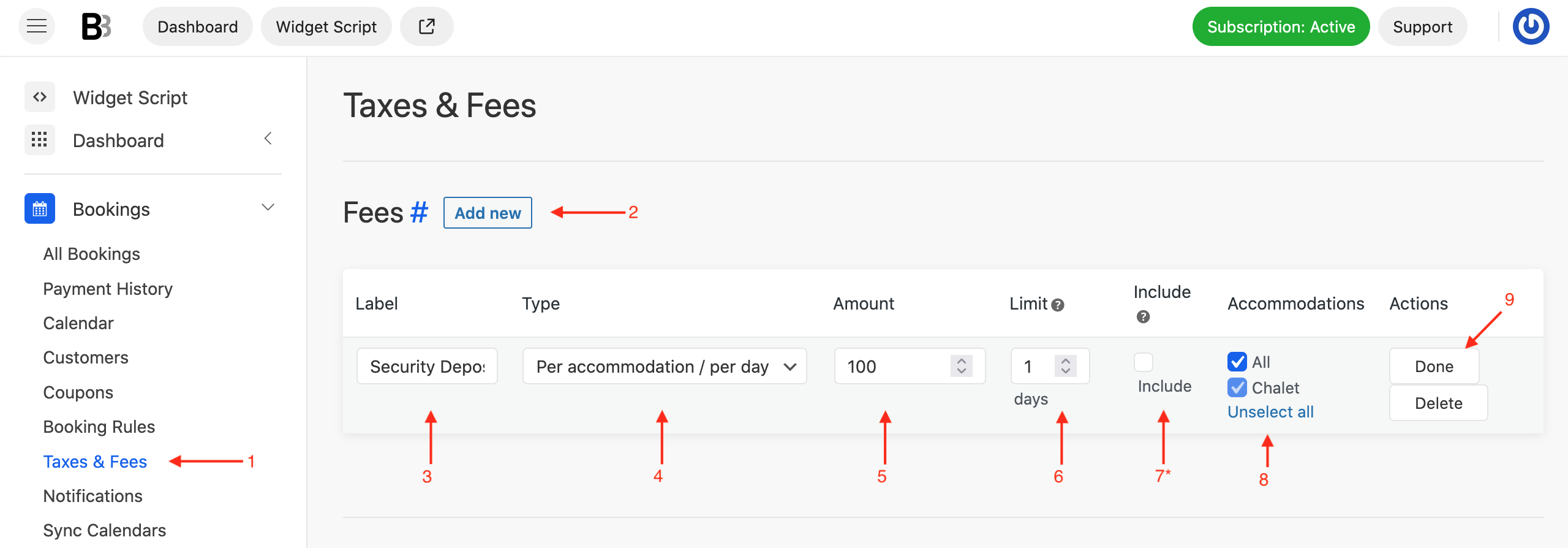
To add a security deposit:
- Navigate to Dashboard > Bookings > Taxes and Fees.
- Click the Add New button in the Fees section.
- In the Label field, type “Security Deposit” or any text you want your guests to see at checkout.
- In the Type field, select Per accommodation / per day.
- Enter the Amount you want to charge.
- In the Limit field, enter 1 to ensure the deposit is charged only once per booking.
- If you want the deposit to be included in the total booking price, check Include. If you prefer it to appear separately, leave this box unchecked.
- Choose the Accommodations you want the security deposit to apply to, or select All.
- Click Done.
- Scroll down and Save Changes.
Navigate to your booking form to verify how the security deposit appears and functions for guests.
This process ensures your security deposit is correctly added to bookings while giving you control over how and when it is collected and refunded.